
WriteFlow
Proofread, rewrite, translate and reply — right where you type,
in any app, with a single tap. No copying. No switching.
Free to start Works in every app Private by design
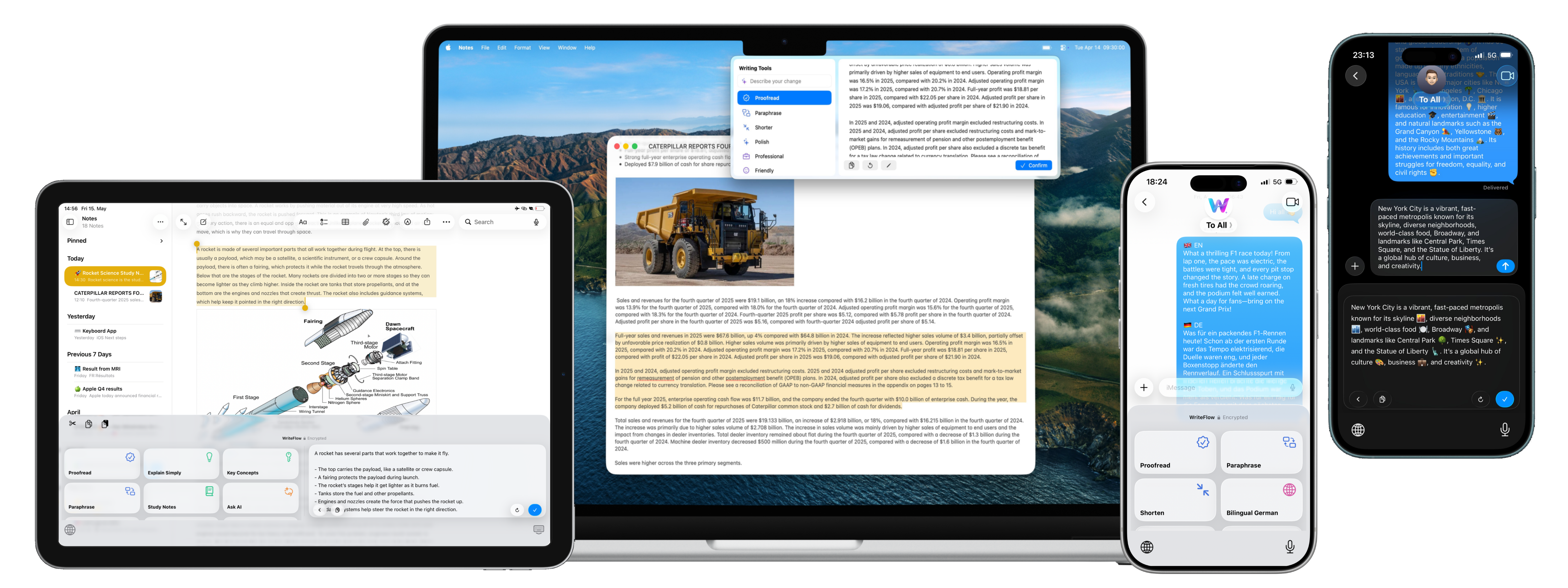
Works right inside the apps you already use
Three taps,
not three apps.
No selecting, no copy-paste, no prompt-writing. WriteFlow lives right where you already type.
Type like you always do
Write your message, email or note in any app — rough, fast, however it comes out.
Tap a writing tool
Proofread, rewrite, change the tone, translate or reply — pick one and WriteFlow gets to work.
Done, in place
Your text is transformed right where it is. No switching apps, no pasting back.
In any app
Write better
everywhere you type.
Messages, WhatsApp, Mail, Notes — anywhere you type on iPhone, WriteFlow is one tap away to proofread, rewrite, restyle the tone or reply.
- Works in any app with a keyboard
- Proofread, rewrite and adjust the tone
- Fixes land right where you're typing

50+ languages
Translate and go bilingual instantly.
Get a clean translation in seconds, or reply in two languages at once with bilingual mode — 50+ languages, right inside the chat.

Library & prompts
A rich Library and custom AI prompts.
A Library built for every situation — rewriting, tone, translation, study, work. Pin the tools you use most, or build your own custom AI prompts.
- Curated prompt collections for every task
- Build and save your own custom prompts
- Synced across iPhone, iPad and Mac with iCloud

Your words
stay yours.
No keystroke logging
The keyboard never reads what you type unless you explicitly trigger a prompt.
No tracking, no ads
We don't sell your data. We don't have a data business. We make an app.
Encrypted in transit
Your words are protected with encryption. Nothing stored, nothing kept.
Get WriteFlow.
Made for everything you want to write.
For your iPhone, iPad and Mac.
Simple pricing.
Start free, then upgrade when you're ready. One subscription covers iPhone, iPad and Mac.
- Unlimited AI rewrites & translations
- 50+ languages
- Custom prompts & full library
- Cancel anytime
- Everything in Monthly
- ~€6.66 per month
- Save vs. monthly billing
- Cancel anytime
- Everything in Monthly
- Just €5.00 per month
- Best value — save 30%
- Cancel anytime
- Start free — no card required
- Cancel anytime
- iPhone, iPad & Mac
- Private by design
Web prices shown in EUR. Same prices on the App Store, billed in your local currency.
Good to know.
Everything you might be wondering before you start.
Do I have to select or copy my text first?
No. Type in any app, tap a WriteFlow tool, and your text is transformed right in place — no selecting, copying or switching apps.
Which apps does it work in?
Anywhere you can type — Messages, WhatsApp, Mail, Gmail, Slack, Notes, and more. On Mac, WriteFlow works system-wide: select text and press ⌘W.
Is my writing private?
Yes. The keyboard only reads your text when you explicitly trigger a tool — it never logs keystrokes. Your words are encrypted in transit and aren't stored after a request completes.
Is there a free version?
Yes. Download and start using WriteFlow for free every day. Upgrade to Pro whenever you want unlimited rewrites, translations and prompts.
Which devices are supported?
iPhone, iPad and Mac. One subscription covers all of them, and your library syncs across devices via iCloud.
Do I need an account, and can I cancel anytime?
You can start without an account; sign in to sync your subscription and custom prompts across devices. You can cancel anytime from the App Store or your account — no questions asked.